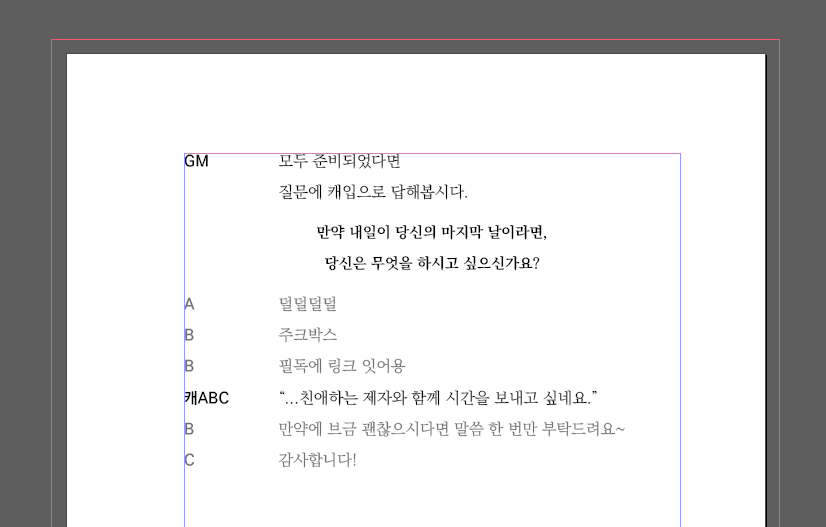
리플레이북 제작을 위해 사용했던 인디자인 자동화 스크립트를 배포합니다.
기능
1. desc, emas 자동 중앙정렬
2. 캐릭터: 대사 형식을 캐릭터 대사 형태로 자동바꿈
3. This message has been hidden. 자동 제거
4. 사담대화 회색글씨 적용
5. 따옴표 자동변경
+ 마기카로기아 TATECK님 커스텀 시트 한정 판정&각종표 자동변형
!!저는 코딩을 전혀 모르며 제미나이의 도움을 받아서 자동화한 것입니다!!
사용방법
1. Roll20에서 세션 로그 복사하기
- 롤20 세션 방에 접속한 후, 채팅기록 우측 상단의 [View all chat log for this game]을 클릭하여 전체 로그 창을 띄운다.
- 해당 창에서 F12 키를 눌러 개발자 도구 실행
- 상단 탭 중 [Console] 항목을 선택
- 입력창에 하단 코드를 복사하여 붙여넣은 뒤 엔터
- 롤20 채팅기록 복사
//desc emas 앞에 붙이고 이미지에 [] 붙이기기
// 1. 시간과 아바타 미리 지우기
$('.tstamp, .avatar').remove();

// 2. desc, emote 처리
$('div.message.desc, div.message.emote').each(function() {
  const $img = $(this).find('img');
  if ($img.length > 0) {
    $(this).replaceWith('{{' + $img.attr('src') + '}}<br>');
  } else {
    $(this).replaceWith('{{' + $(this).text().trim() + '}}<br>');
  }
});

// 3. general 이미지 처리만 추가
$('div.message.general').each(function() {
  const $img = $(this).find('img');
  if ($img.length > 0) {
    // 이미지를 [주소] 텍스트로 바꾸고, 이름과 글자는 그대로
    const src = $img.attr('src');
    $img.replaceWith('[' + src + ']');

    // 최종적으로 한 줄로 정리 (이름: [주소])
    const content = $(this).text().trim().replace(/\s+/g, ' ');
    $(this).replaceWith(content + '<br>');
  }
});


// 2. 시스템 안내문 및 히든 메시지 통합 제거
document.querySelectorAll('.message.system, .message.hidden-message').forEach(el => {
  if (el.classList.contains('hidden-message') || el.innerHTML.includes('#aaaaaa')) {
    el.remove();
  }
});
+ 마기카로기아 TATECK님 커스텀 시트 한정 판정&각종표 자동변형
- 각 판정의 맨 앞에 @기호가 붙는 것은 정상이며, 이후 스크립트 작동시 필요한 기호입니다.
//마법 바꾸기 매크로
// [1] 필요한 함수 정의
const getT = (el, selector) => el.querySelector(selector)?.textContent.trim() || '';

function getDiceDetails(div) {
  const diceValues = Array.from(div.querySelectorAll('.sheet-dice-list > span.inlinerollresult')).map(e => e.textContent.trim());
  const mod = getT(div, '.sheet-dice-mod .inlinerollresult');
  const judge = getT(div, '.sheet-point-bar');
  const elementRaw = getT(div, '[class^="sheet-cate"] span');

  let diceDisplay = diceValues.length ? `(${diceValues.join(', ')})` : '';
  let modDisplay = mod ? ` [+${mod}]` : '';
  let element = elementRaw ? (elementRaw.includes('발생') ? `[[${elementRaw}]]` : `[[${elementRaw} 발생]]`) : '';

  return { diceDisplay, modDisplay, judge, element };
}

// [2] 메인 변환 로직
document.querySelectorAll('.sheet-magiWrap').forEach(div => {
  const pre = document.createElement('pre');
  pre.style.cssText = 'white-space: pre-wrap; font-family: monospace;';

  const hasMagicDesc = div.querySelector('.sheet-desc .sheet-badge');
  const hasDiceGroup = div.querySelector('.sheet-dice-group');
  const hasRandArea = div.querySelector('.sheet-randArea');
  const hasJudgeOnly = div.querySelector('.sheet-dice-box');
  const hasSceneTitle = div.querySelector('.sheet-sub-title');

  let rawContent = '';

  // 1. 마법 판정
  if (hasMagicDesc) {
    const name = getT(div, '.sheet-name span');
    const title = getT(div, '.sheet-title strong');
    const type = getT(div, '.sheet-badge .sheet-type');
    const cost = getT(div, '.sheet-badge .sheet-cost');
    const target = getT(div, '.sheet-badge .sheet-target');
    const sea = getT(div, '.sheet-diceArea-info .inlinerollresult');
    const achieve = getT(div, '.sheet-targetArea .inlinerollresult');
    const finalResult = getT(div, '.sheet-diceArea .inlinerollresult');

    const { diceDisplay, modDisplay, judge, element } = getDiceDetails(div);
    const txtList = Array.from(div.querySelectorAll('.sheet-desc .sheet-txt')).map(e => e.textContent.trim());
    const effectText = txtList[0] || '';
    const flavorText = txtList.slice(1).map(txt => `[[${txt}]]`).join('\n');

    let line4 = (finalResult && achieve) ? `\n${name}:${sea ? `《${sea}》 • ` : ''}달성치 ${achieve} → ${finalResult} ${diceDisplay}${modDisplay}${judge ? ` ##${judge}##` : ''} ${element}`.replace(/\s+/g, ' ') : '';

    rawContent = `【${title}】\n${type} • ${cost} • ${target}${sea ? ` • 《${sea}》` : ''}\n${effectText}\n${flavorText}${line4}`;
  }

  // 2. 주사위 그룹
  else if (hasDiceGroup) {
    const title = getT(div, '.sheet-title strong');
    const result = getT(div, '.sheet-dice-box .inlinerollresult');
    const detail = div.querySelector('.sheet-dice-box .inlinerollresult')?.getAttribute('title') || '';
    const rollingMatch = detail.match(/Rolling\s+([^=]+)=/i);
    const diceFormula = rollingMatch ? rollingMatch[1].trim() : getT(div, '.sheet-point-bar');
    rawContent = `《${title}》 • ${diceFormula} → ${result}`;
  }

  // 3. 가변 판정
  else if (hasRandArea) {
    const title = getT(div, '.sheet-title strong');
    const rand = getT(div, '.sheet-randArea .inlinerollresult');
    const achieve = getT(div, '.sheet-targetArea .inlinerollresult');
    rawContent = `${title}\n《${rand}》 • 달성치 ${achieve}`;
  }

  // 4. 일반 판정
  else if (hasJudgeOnly) {
    const title = getT(div, '.sheet-title strong');
    const achieve = getT(div, '.sheet-target .inlinerollresult');
    const finalResult = getT(div, '.sheet-dice-box .inlinerollresult');
    const { diceDisplay, modDisplay, judge, element } = getDiceDetails(div);

    let line = `《${title}》`;
    if (achieve && finalResult) {
      line += ` • 달성치 ${achieve} → ${finalResult} ${diceDisplay}${modDisplay}${judge ? ` ##${judge}##` : ''} ${element}`;
    }
    rawContent = line.replace(/\s+/g, ' ');
  }

  // 5. 장면 정보
  else if (hasSceneTitle) {
    const cycle = getT(div, '.sheet-name span');
    const actor = getT(div, '.sheet-title strong');
    const style = getT(div, '.sheet-sub-title');
    const stage = getT(div, '.sheet-desc strong');
    const desc = getT(div, '.sheet-desc .inlinerollresult');
    rawContent = [cycle, `${actor}의 장면 · ${style}`, stage, desc].filter(Boolean).join('\n');
  }

  // 6. 단순 표/기타
  else if (div.querySelector('.sheet-title strong')) {
    const title = getT(div, '.sheet-title strong');
    const descText = getT(div, '.sheet-desc');
    const diceList = Array.from(div.querySelectorAll('.sheet-diceArea .inlinerollresult')).map(e => e.textContent.trim()).join(', ');
    rawContent = `${title}${diceList ? ' ' + diceList : ''}\n${descText}`;
  }

  // 모든 줄(Line)의 앞에 @를 붙임
  pre.textContent = rawContent.split('\n').map(line => line.trim() ? '@' + line : line).join('\n');
  div.replaceWith(pre);
});

//
2. 인디자인 스크립트 설치
- 첨부파일에 있는 스크립트 파일 다운로드
- 인디자인 상단 메뉴에서 [창(Window)] > [유틸리티(Utilities)] > [스크립트(Scripts)] 패널을 활성화
- 패널 위쪽의 가로선 3개 버튼에 마우스 오른쪽 버튼을 클릭하고 [탐색기에서 보기(Reveal in Explorer)] 선택
- 열린 탐색기 안에 스크립트 파일을 넣습니다.
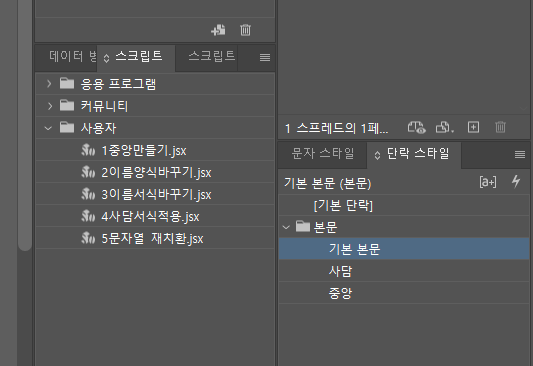
이런 식으로 떠야 정상입니다.
3. 인디자인 파일 작업
첨부 파일의 인디자인 파일을 다운로드 받습니다. 열면 첫 페이지만 있을 겁니다. 거기다 아까 복사해두었던 롤20 채팅 로그를 붙여넣습니다.
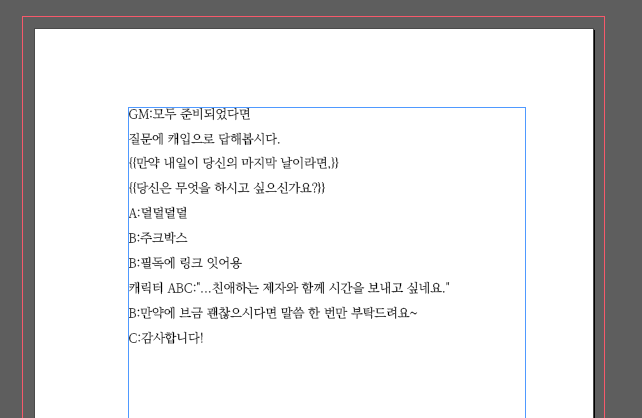
번호 순서에 따라 스크립트를 작동시킵니다.
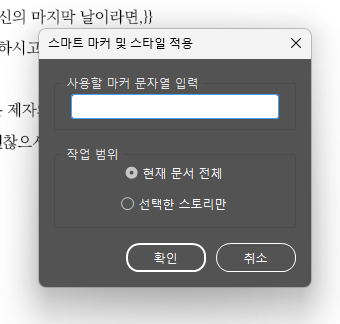
1중앙만들기
마커 문자열은 스크립트 동작을 위해 각 문장 맨 앞에 삽입하는 문자열입니다. @를 제외한 어떤 문자열이라도 좋으나, 채팅에 등장할 가능성이 있는 문자는 피해주세요.
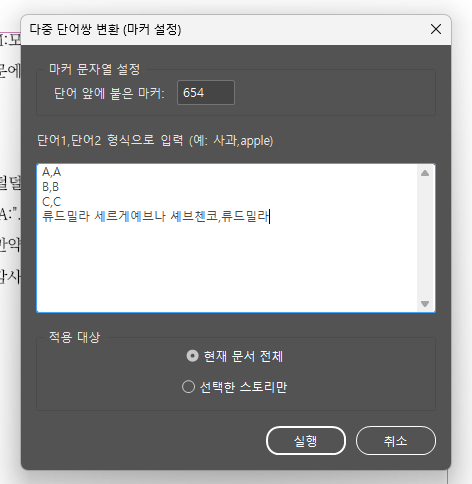
2이름양식바꾸기
상단의 빈칸에는 앞서 입력한 마커 문자열을 입력합니다.
하단의 빈칸에는
이름,이름
이름2,이름2
형식으로 채팅에 사용된 이름을 입력합니다.(캐릭터 이름과 오너 이름, npc 이름 등. 만약 넣지 않으실 경우 수동으로 수정해야 합니다.)
원하실 경우 여기에서 이름을 변경할 수도 있습니다. 앞의 문자열은 채팅에 사용된 이름, 뒤의 문자열은 바꾸고 싶은 이름을 넣어주세요.
3이름서식바꾸기
클릭하면 자동으로 진행됩니다.
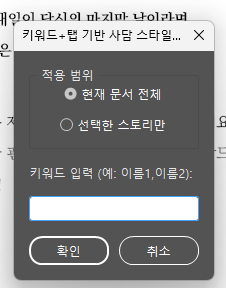
4사담서식적용
사담을 적용할 오너의 닉네임을 쉼표로 구분하여 적습니다.
5문자열재치환
빈칸에 앞서 입력한 마커 문자열을 입력합니다.
6따옴표바꾸기
클릭하신 후 자동으로 진행됩니다.
유의점: 띄어쓰기와 탭 바로 뒤의 따옴표를 여는 따옴표로, 나머지를 닫는 따옴표로 바꾼 매크로이기 때문에, 글자 바로 뒤에 따옴표를 쓰셨다면 닫는 따옴표로 나옵니다. 수동으로 변경해주셔야 합니다.
완료하시면 이런 식으로 변경됩니다!